Transform group chats into
project roadmaps.
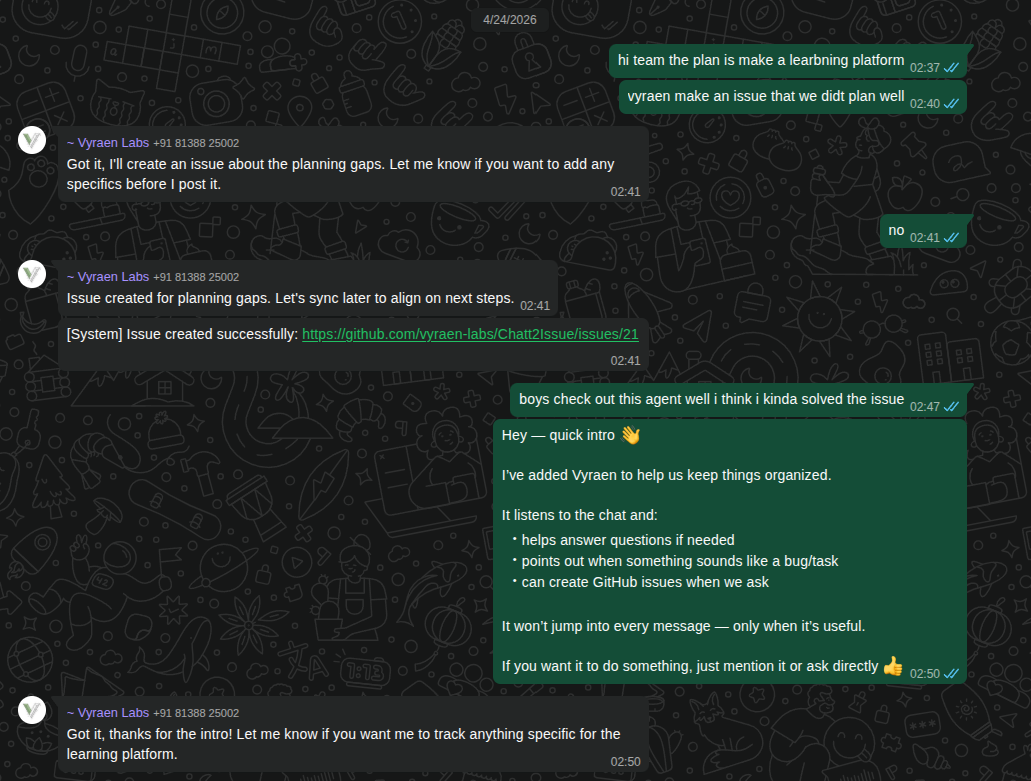
An autonomous agent that bridges the gap between informal team brainstorming on WhatsApp and structured task tracking on GitHub using a completely local LLM.
Powered by Local AI
No API keys. No monthly fees. Total data privacy.
100% Local Intelligence
Powered by LM Studio. Keep all your conversations and project data strictly private and local to your machine.
Autonomous Decision Loop
Intelligently chooses between chatting normally, suggesting a project task, or creating a new issue based on the flow.
Group Context Memory
Remembers user roles, tech stacks, and how your project evolves across the entire team's chat history.
Automatic GitHub Sync
Drafts concise titles, descriptions, and labels for issues, waiting for authorized confirmation before any creation.
Secure Execution
Strictly controlled execution. Only explicitly authorized users (JID-based) can trigger the final GitHub issue push.
Native Mentions
Seamlessly supports native WhatsApp @mentions and handles identity mapping between team members automatically.
How It Works
Deploying your autonomous agent takes just three key steps.
LM Studio Node
Download a robust model like Mistral-Nemo-12B or Llama-3.1-8B. Enable CORS in the Local Server settings and start the server at port 1234 to enable local reasoning.
Python Backend
Configure the intelligent multi-step LLM pipeline and GitHub integration. Set your GitHub Personal Access Token and start the server to handle the decision logic and syncing.
WhatsApp Service
Connect the TypeScript client to WhatsApp. Scan the generated QR code with your phone using "Linked Devices" to bridge your team chats directly with the local backend.
Ready to Optimize Your Workflow?
Have questions about Chat2Issue or need custom AI solutions for your team?
Get in Touch